Author: David Evestaff

  • Digital Transformation 101: A Beginner's Guide for Accountants, Retailers, and Healthcare Practices

    Digital Transformation 101: A Beginner's Guide for Accountants, Retailers, and Healthcare Practices

    Digital transformation. It's one of those phrases that gets thrown around in boardrooms, LinkedIn posts, and IT sales pitches constantly. But what does it actually mean for your business? And more importantly, how do you get started without feeling completely overwhelmed?

    Whether you're running an accountancy practice in Manchester, a retail shop in Brighton, or a healthcare clinic in London, the principles of digital transformation remain surprisingly similar. The difference lies in the application.

    Let's break it down in plain English.

    What Is Digital Transformation, Really?

    At its core, digital transformation is about converting manual processes and physical data into digital formats: then using technology to make your business run smarter, faster, and more efficiently.

    It's not about ripping everything out and starting fresh. That's a recipe for disaster (and a very expensive one at that). Instead, think of it as gradual, intentional improvements that stack up over time.

    Swapping paper invoices for digital ones? That's transformation. Moving client records to a secure cloud system? Transformation. Using software to automate appointment reminders? You guessed it.

    Office desk showing paper documents turning into digital files, illustrating digital transformation for UK businesses

    Why Does It Matter Now More Than Ever?

    The UK business landscape has shifted dramatically over the past few years. Customer expectations have changed. Remote and hybrid working is here to stay. Cybersecurity threats are more sophisticated than ever.

    Businesses that cling to outdated systems are finding themselves at a competitive disadvantage. Meanwhile, those embracing digital tools are saving time, reducing errors, and delivering better customer experiences.

    For accountants, this means clients expect real-time financial insights, not quarterly reports delivered by post. For retailers, it means seamless online and in-store experiences. For healthcare practices, it means secure patient portals and efficient appointment systems.

    The question isn't whether to transform: it's how quickly you can do it sensibly.

    Step One: Assess Where You Currently Stand

    Before diving into shiny new software, take a step back and honestly evaluate your current situation. Ask yourself:

    • Which processes still rely on paper or manual data entry?
    • Are your systems talking to each other, or are you constantly copying information between platforms?
    • Do your team members struggle with the technology they're using?
    • What feedback have customers given about your digital services?

    This reality check isn't about criticism: it's about clarity. You can't plot a route if you don't know your starting point.

    Consider surveying your staff too. They're often the first to spot inefficiencies that management might overlook.

    Step Two: Set Goals That Actually Make Sense

    Once you know where you stand, it's time to figure out where you want to go. But here's the trap many businesses fall into: setting vague or overly ambitious goals.

    "We want to be fully digital" sounds great but means nothing concrete. Instead, try goals like:

    • Reduce invoice processing time by 50% within six months
    • Enable 80% of patient appointment bookings online by Q3
    • Implement a unified point-of-sale and inventory system across all retail locations

    These goals are specific, measurable, and tied to real business outcomes. They also help you prioritise which transformations to tackle first.

    Target with arrow and business icons symbolizing goal setting in digital transformation for accountants, retailers, and healthcare

    The Three Pillars of Successful Transformation

    Technology

    This is the obvious one. Digital transformation requires digital tools: whether that's cloud accounting software, customer relationship management (CRM) systems, electronic health records, or modern point-of-sale systems.

    But technology alone isn't the answer. Buying expensive software that nobody uses is just throwing money away. The tools need to fit your workflows, not the other way around.

    Leadership Buy-In

    Transformation initiatives that lack senior support tend to fizzle out. Leaders need to champion the change, allocate proper resources, and model the behaviours they want to see.

    If the practice partner still insists on paper files while telling everyone else to go digital, the message is clear: and it's not a helpful one.

    Employee Empowerment

    Your team needs proper training and ongoing support. Introducing new systems without adequate preparation leads to frustration, workarounds, and ultimately, failure.

    Invest in training. Create internal champions who can support colleagues. Make it safe to ask questions and admit when something isn't working.

    Sector-Specific Considerations

    For Accountants

    The accountancy sector has seen massive change with Making Tax Digital requirements and the rise of cloud-based platforms like Xero, QuickBooks, and Sage. If you're still running desktop software and manually reconciling bank statements, you're already behind.

    Key areas to focus on:

    • Cloud accounting platforms for real-time collaboration with clients
    • Automated bank feeds and reconciliation
    • Secure document portals for client file sharing
    • Digital signatures for engagement letters and approvals

    For Retailers

    Retail is perhaps the most customer-facing sector, which means digital transformation directly impacts sales and loyalty. The line between online and offline shopping has blurred: customers expect consistency across channels.

    Key areas to focus on:

    • Integrated point-of-sale and e-commerce platforms
    • Real-time inventory management across locations
    • Customer data platforms for personalised marketing
    • Contactless payment and self-checkout options

    Healthcare reception with tablet scheduling patient, depicting digital transformation benefits in UK healthcare practices

    For Healthcare Practices

    Healthcare transformation must balance efficiency with strict data protection requirements. Patient trust is paramount, and any digital systems must be secure, compliant, and accessible.

    Key areas to focus on:

    • Electronic health records with proper NHS integration where applicable
    • Online appointment booking and automated reminders
    • Secure patient communication portals
    • Telehealth capabilities for remote consultations

    The Phased Approach: Don't Try to Do Everything at Once

    One of the biggest mistakes we see is businesses attempting a complete overhaul simultaneously. It's exhausting for staff, expensive, and risky.

    Instead, break your transformation into phases:

    Phase 1: Foundation – Get the basics right. Digitise your core records, ensure your internet infrastructure is solid, and implement basic cybersecurity measures.

    Phase 2: Process Improvement – Automate repetitive tasks, introduce workflow software, and connect your key systems so they share data.

    Phase 3: Enhancement – Add customer-facing digital services, explore advanced analytics, and look at emerging technologies like AI-assisted tools.

    Each phase should have clear milestones, assigned responsibilities, and realistic timelines. Celebrate the wins along the way: transformation is a marathon, not a sprint.

    Measuring Success

    How do you know if your transformation is working? By tracking meaningful metrics:

    • Time saved on specific tasks
    • Error rates before and after implementation
    • Customer satisfaction scores
    • Staff adoption rates of new systems
    • Cost savings or revenue increases attributable to digital changes

    Review these regularly and adjust your approach as needed. Transformation isn't a one-time project: it's an ongoing commitment to improvement.

    A Word on Partners and Support

    You don't have to figure this out alone. Working with an experienced IT partner can save you time, money, and considerable headaches. They'll help you choose the right solutions, implement them properly, and provide ongoing support when things inevitably go sideways.

    At Evestaff IT Support and Consultancy, we've guided businesses across sectors through their digital transformation journeys: from initial assessments through to full implementation and beyond.

    We also work closely with propertyinventoryclerks.co.uk, helping property professionals digitise their inventory and reporting processes. If you're in the lettings or property management space, they're worth a look.

    Ready to Take the First Step?

    Digital transformation doesn't have to be intimidating. Start with an honest assessment, set realistic goals, and take it one step at a time. The businesses that thrive in 2026 and beyond will be those that embrace technology thoughtfully: not recklessly.

    If you're unsure where to begin or want a second opinion on your current IT setup, we're here to help.

    Book a free discovery call, let's Talk – https://itandconsultancy.co.uk/lets-talk/
  • Does Your Business Really Need an IT Consultant? Here's the Truth

    Does Your Business Really Need an IT Consultant? Here's the Truth

    Let's be honest. When someone mentions "IT consultant," you might picture an expensive suit walking through your office, spouting jargon, and handing you a bill that makes your eyes water.

    But here's the thing: that stereotype is outdated. And it might be costing your business more than you realise.

    Whether you're running a growing SME, managing a property business, or leading a team that's outgrown its current tech setup, the question of whether to bring in IT expertise is one that deserves a straight answer.

    So let's cut through the noise and get to the truth.

    The Real Question You Should Be Asking

    It's not really "Do I need an IT consultant?" The better question is: "What is my current IT situation actually costing me?"

    Most small business owners we speak to don't have a full-time IT department. They've got Dave from accounts who's "good with computers," or they're relying on that one employee who set up the Wi-Fi three years ago and has been the unofficial tech support ever since.

    Sound familiar?

    The problem isn't that these people aren't capable. It's that IT has become genuinely complex. Cybersecurity threats are more sophisticated. Cloud systems need proper configuration. And one wrong software purchase can set you back thousands.

    Office workspace with invoices, laptop, and hourglass emphasising hidden business IT costs

    Signs Your Business Might Need IT Support

    Not every business needs an IT consultant. But many do, and don't realise it until something goes wrong. Here are some telltale signs:

    1. You're Experiencing Regular Downtime

    If your systems crash, your email goes down, or your team can't access files more than occasionally, you've got a problem. Downtime doesn't just frustrate your staff, it costs you money and damages your reputation with clients.

    2. You're Not Sure If Your Data Is Secure

    Small businesses are increasingly targeted by cybercriminals precisely because they often lack robust security measures. If you're not 100% confident in your backup systems, firewalls, and data protection protocols, that's a red flag.

    3. Technology Decisions Feel Overwhelming

    Should you move to the cloud? Which CRM is right for your business? Is that new software actually worth the investment? If these questions make you want to bury your head in the sand, you're not alone, and you'd benefit from expert guidance.

    4. Your IT Setup Can't Keep Up With Growth

    What worked when you had five employees might not work when you have fifteen. If your infrastructure is creaking under the weight of your success, it's time to think strategically about scaling.

    5. You're Spending Too Much Time on Tech Issues

    Every hour you spend troubleshooting printer problems or resetting passwords is an hour you're not spending on growing your business. Time is money, and IT headaches are expensive.

    Small business owner overwhelmed by IT issues at cluttered desk highlighting need for IT consultant

    The Measurable Benefits of Working With an IT Consultant

    Let's talk numbers, because that's what matters when you're running a business.

    A survey by SCORE found that small businesses engaging with consultants saw a 70% increase in operational efficiency. That's not a small bump, that's transformational.

    Here's what else an IT consultant brings to the table:

    Cost Reduction

    It sounds counterintuitive, pay someone to save money?, but it's true. A good IT consultant helps you avoid expensive mistakes. They'll steer you away from software that doesn't fit your needs, negotiate better deals with vendors, and implement solutions that actually work first time.

    Enhanced Security

    Cybersecurity isn't optional anymore. IT consultants provide risk assessments, threat detection, and security protocols that protect your business from attacks. For SMEs without dedicated security staff, this is invaluable.

    Scalability

    Your IT infrastructure should grow with your business, not hold it back. Consultants help you plan for the future, ensuring your systems can handle expansion without expensive overhauls.

    Time Savings

    When someone else handles your IT management, you get to focus on what you do best, running your business. No more midnight calls about server issues or weekend emergencies.

    Expert Knowledge

    Technology moves fast. IT consultants stay on top of the latest trends, tools, and threats so you don't have to. They bring specialised expertise that would be impossible to maintain in-house for most small businesses.

    Common Myths About IT Consultants (Debunked)

    Let's tackle some of the misconceptions that might be holding you back.

    "It's Too Expensive"

    Yes, there's a cost. But compare it to the cost of a data breach, a week of downtime, or buying the wrong enterprise software. Most businesses find that IT consulting pays for itself many times over.

    "We're Too Small to Need One"

    Actually, smaller businesses often benefit the most. You don't have the resources for a full IT department, but you still face the same technological challenges as larger companies. An IT consultant gives you enterprise-level expertise without the enterprise-level salary bill.

    "We Can Just Google It"

    You can Google a lot of things. But would you Google how to do your own dental work? Some things require professional expertise. IT strategy, security, and infrastructure are among them.

    "Our Current Setup Works Fine"

    "Works fine" and "works optimally" are very different things. Many businesses don't realise how much they're leaving on the table until they see what's possible with the right systems in place.

    Small business IT ecosystem showcasing secure server, cybersecurity, and operational efficiency

    When DIY IT Actually Makes Sense

    To be fair, not every situation requires a consultant. If you're a sole trader with basic needs, email, a simple website, and standard office software, you might manage perfectly well on your own.

    But the moment you start handling customer data, processing payments, or scaling your team, the stakes change. The risk of getting it wrong becomes too high to leave to chance.

    How to Choose the Right IT Consultant

    If you've decided that expert help makes sense, here's what to look for:

    Local Knowledge: A consultant who understands the UK business landscape and regulatory environment (hello, GDPR) will serve you better than a generic offshore service.

    Clear Communication: Avoid anyone who hides behind jargon. The best consultants explain things in plain English and make sure you understand your options.

    Proven Track Record: Ask for case studies or testimonials. A good consultant will have happy clients willing to vouch for them.

    Aligned Values: You want someone who treats your business like their own, not someone who's just looking to sell you the most expensive solution.

    A Quick Word for Property Professionals

    If you're in the property sector, you'll know that technology is transforming how inventory clerks, letting agents, and property managers work. Our friends at propertyinventoryclerks.co.uk are doing fantastic work helping property professionals streamline their operations.

    Whether it's digital inventory systems, cloud-based property management, or secure data handling, the intersection of property and technology is an area where the right IT support makes a genuine difference.

    The Bottom Line

    So, does your business really need an IT consultant?

    If technology is causing you headaches, costing you time, or keeping you awake at night worrying about security, the answer is probably yes.

    The truth is, most small businesses benefit significantly from professional IT guidance. Not because they can't manage on their own, but because they shouldn't have to. Your expertise is in running your business. Let someone else handle the tech.

    And if you're still not sure? That's exactly what discovery calls are for.


    Ready to find out how IT support could transform your business?

    Book a free discovery call, let's Talk

  • Big Four IT Consultants Vs Challenger Firms: Which Is Better For Your Business?

    Big Four IT Consultants Vs Challenger Firms: Which Is Better For Your Business?

    When it comes to choosing an IT consultant for your business, the decision often boils down to one big question: do you go with the established giants, or take a chance on a smaller, more agile firm?

    The Big Four, Deloitte, PwC, EY, and KPMG, have dominated the professional services landscape for decades. Their names carry weight, their resources seem endless, and their client lists read like a who's who of global enterprise. But challenger firms are nipping at their heels, offering something the giants often struggle to deliver: personalised service, flexibility, and genuine partnership.

    So which option is actually better for your business? Let's break it down.

    What Are the Big Four, Anyway?

    Before we dive into comparisons, let's establish who we're talking about. The Big Four refers to the four largest professional services networks in the world:

    • Deloitte
    • PwC (PricewaterhouseCoopers)
    • EY (Ernst & Young)
    • KPMG

    Originally known for accounting and audit services, these firms have expanded massively into IT consulting, cybersecurity, cloud transformation, and digital strategy. They employ hundreds of thousands of people globally and generate revenues in the tens of billions.

    When people think "enterprise IT consulting," these are usually the first names that come to mind.

    image_1

    The Case for the Big Four

    There's no denying the appeal of working with a Big Four firm. Here's what they bring to the table:

    Vast Resources and Cutting-Edge Technology

    The Big Four have deep pockets. This means access to sophisticated software, proprietary tools, intensive training programmes, and substantial financial means to deliver complex solutions. If your project requires bleeding-edge technology or massive scale, they've likely got the infrastructure to support it.

    Global Reach and Enterprise Relationships

    Need consultants who can operate across multiple countries and time zones? The Big Four have offices everywhere. They also maintain long-standing relationships with multinational corporations, which can be valuable if your business operates at that level or aspires to.

    Brand Recognition and Credibility

    Let's be honest: putting "Deloitte" or "PwC" on your project portfolio carries a certain cachet. For businesses seeking external validation or preparing for acquisition, having a Big Four stamp of approval can be genuinely valuable.

    Specialist Expertise at Scale

    With thousands of consultants across every conceivable specialism, the Big Four can assemble teams with very specific expertise. Need a cybersecurity architect who specialises in healthcare compliance? They've probably got three.

    The Case Against the Big Four

    Now for the reality check. Working with a Big Four firm isn't always the golden experience the brochures promise.

    You Might Not Be a Priority

    Here's an uncomfortable truth: unless you're a massive enterprise client, you're probably not going to get the A-team. Big Four firms have been observed shifting complex, high-risk clients to smaller competitors, focusing their best resources on the accounts that generate the most revenue.

    For small and medium-sized businesses, this often means being handed off to junior consultants or placed lower on the priority list.

    image_2

    The Price Tag Is Eye-Watering

    Big Four daily rates can make your eyes water. We're talking hundreds of pounds per hour, with projects often ballooning well beyond initial estimates. For SMEs watching their budgets carefully, this can be a dealbreaker.

    Bureaucracy and Rigidity

    Large organisations come with large processes. Getting approvals, making changes, or pivoting direction can feel like turning a tanker. If your business needs agility: and most do these days: this can be genuinely frustrating.

    One-Size-Fits-All Approaches

    Despite having vast resources, Big Four firms often rely on standardised methodologies and frameworks. That's efficient for them, but it doesn't always translate to solutions that fit your unique business needs.

    Enter the Challenger Firms

    Challenger firms occupy the space between the Big Four giants and small independent consultancies. Think firms like BDO, Mazars, Grant Thornton, and yes, specialist IT consultancies like Evestaff IT Support and Consultancy.

    These firms are increasingly attractive to businesses that want professional expertise without the enterprise price tag or impersonal service.

    Greater Flexibility and Attention

    With challenger firms, you're not just another account number. You're more likely to work directly with senior consultants who understand your business and can make decisions quickly. This translates to faster responses, more tailored solutions, and genuine partnership.

    Diverse Experience Across Business Types

    Interestingly, challenger firms often offer broader experience than the Big Four. Rather than being siloed into specific industries or client types, consultants at smaller firms typically work across multinational corporations, medium-sized businesses, and tech startups. This diversity can bring fresh perspectives to your projects.

    Competitive Pricing

    Without the massive overhead costs of global operations, challenger firms can offer genuinely competitive rates. For SMEs, this often means accessing expert-level consultancy at a fraction of the Big Four price.

    image_3

    Local Knowledge and Relationships

    Many challenger firms operate regionally, building deep knowledge of local business environments and regulations. If your business operates primarily in the UK, working with a UK-based firm that understands HMRC, UK data protection requirements, and the local competitive landscape can be invaluable.

    The Potential Downsides of Challenger Firms

    It's not all rosy in challenger territory. There are legitimate concerns to consider:

    Capacity Constraints

    The Financial Reporting Council has noted that some challenger firms are "growing too fast" and have "ingested too many audits into their portfolios without having the right capability capacity." This is worth considering: make sure any firm you work with has the bandwidth to genuinely support your project.

    Limited Global Reach

    If your business operates across multiple continents and needs seamless international support, challenger firms may struggle to match the Big Four's global footprint.

    Perceived Credibility

    Rightly or wrongly, some stakeholders place higher value on Big Four involvement. If external perception is critical: say, for investor relations or regulatory purposes: this may influence your decision.

    So Which Is Actually Better for Your Business?

    Here's the honest answer: it depends entirely on your specific situation.

    Consider the Big Four if:

    • You're a large enterprise with complex, multi-national requirements
    • External brand credibility is genuinely important for your stakeholders
    • You need very specific, niche expertise at massive scale
    • Budget is secondary to other considerations

    Consider a challenger firm if:

    • You're an SME wanting personalised, attentive service
    • Budget matters and you want value for money
    • You need flexibility and fast decision-making
    • You prefer working with senior consultants who know your business

    image_4

    The Third Option: Specialist IT Consultancies

    Here's something worth considering: for IT support and consultancy specifically, neither the Big Four nor mid-tier challenger firms may be your best option.

    Specialist IT consultancies: firms that focus exclusively on technology support, cybersecurity, cloud services, and IT strategy: often deliver the best combination of expertise, attention, and value for small and medium-sized businesses.

    These firms live and breathe IT. They're not trying to cross-sell audit services or tax advice. They're focused entirely on making your technology work brilliantly for your business.

    Making Your Decision

    Before choosing any IT consultant, ask yourself these questions:

    1. What's my budget reality? Be honest about what you can afford.
    2. How complex is my project? Does it genuinely require global resources?
    3. How important is personalised attention? Will I be a priority client?
    4. What's my timeline? Do I need agility or can I work within enterprise processes?
    5. Who will actually do the work? Am I getting senior consultants or juniors?

    The right IT partner isn't necessarily the biggest or most famous: it's the one that genuinely fits your business needs, budget, and working style.

    Ready to Find the Right IT Partner?

    Choosing between IT consultancy options doesn't have to be overwhelming. Sometimes the best fit is a specialist firm that combines professional expertise with genuine partnership and competitive pricing.

    At Evestaff IT Support and Consultancy, we deliver expert IT support, cybersecurity, and cloud solutions tailored specifically for UK businesses. No corporate bureaucracy, no junior consultants learning on your dime: just experienced professionals who understand your challenges.

    Book a free discovery call, let's Talk – https://itandconsultancy.co.uk/lets-talk/

  • How to Use AI to Tackle Staffing Shortages in Your Business (Easy Guide for 2026)

    How to Use AI to Tackle Staffing Shortages in Your Business (Easy Guide for 2026)

    If you've tried hiring lately, you already know the struggle. The talent pool feels shallow, candidates ghost interviews, and when you do find someone brilliant, they've got three other offers on the table. Staffing shortages aren't going anywhere in 2026, but the way we deal with them is changing fast.

    Here's the good news: Artificial Intelligence isn't just for tech giants anymore. Small and medium-sized businesses across the UK are using AI to work smarter, hire faster, and get more done with leaner teams. And no, you don't need a computer science degree to make it happen.

    Let's break down exactly how you can use AI to tackle staffing shortages in your business this year.

    The Staffing Problem Isn't Going Away

    Before we dive into solutions, let's acknowledge the elephant in the room. The UK is facing a genuine skills gap. Brexit reshaped the labour market, an ageing workforce is retiring faster than new talent is entering, and certain industries: IT, healthcare, hospitality: are feeling the squeeze more than ever.

    Traditional hiring methods just aren't cutting it anymore. Posting a job ad and waiting for CVs to roll in? That worked in 2015. In 2026, you need to be proactive, efficient, and frankly, a bit clever about how you attract and retain talent.

    That's where AI comes in.

    Modern UK office workplace using AI tools for recruitment and optimizing SME staffing efficiency

    Automate Your Recruitment Process

    Let's start with the most obvious application: recruitment itself.

    AI-powered recruiting tools can handle the grunt work that eats up your HR team's time. We're talking about sourcing candidates, screening CVs, scheduling interviews, and even sending follow-up emails. All automated.

    The numbers speak for themselves:

    • 25% reduction in time-to-hire with automated outreach and pipeline management
    • 50% lower cost-to-hire compared to traditional methods
    • 80% faster hiring cycles when AI handles the heavy lifting

    For SMEs without a dedicated recruitment team, this is a game-changer. Instead of spending hours sifting through applications, you can focus on what actually matters: meeting candidates face-to-face and making the right hiring decisions.

    Tools like AI-powered applicant tracking systems can screen high volumes of candidates at scale. They look for keywords, qualifications, and experience that match your requirements, then surface the best candidates for human review. It's not about replacing recruiters; it's about giving them superpowers.

    Shift Your Focus from Headcount to Skills

    Here's a mindset shift that more businesses need to embrace in 2026: stop asking "How many people do we need?" and start asking "What skills do we need?"

    Traditional workforce planning revolves around headcount. You identify a gap, create a job description, and hire someone to fill it. But AI enables a more flexible approach: skills-based hiring.

    AI-powered systems can map your existing team's skills and identify gaps before they become problems. This approach offers several advantages:

    • Greater flexibility as roles evolve and business needs change
    • Spotting transferable experience you might otherwise overlook on a CV
    • Smaller teams accomplishing more with the right combination of capabilities

    Think about it this way. You might not need to hire a full-time data analyst if you upskill an existing team member and give them the right AI tools. You might not need three customer service reps if one person with AI assistance can handle the same volume of enquiries.

    Minimalist team network illustration highlighting AI-driven skills and workforce planning

    Real-Time Workforce Planning

    Remember the days of rigid annual planning cycles? Setting your staffing budget in November and hoping it still made sense by June? Those days are over.

    AI enables continuous workforce planning. Instead of making decisions based on last quarter's data, you can update your staffing strategy as new information emerges. This means:

    • Anticipating staffing gaps months in advance
    • Responding faster to market changes
    • Making data-driven decisions rather than educated guesses

    For seasonal businesses or those in volatile markets, this is particularly valuable. AI can analyse patterns in your workload, customer demand, and even external factors like economic indicators to help you staff appropriately.

    No more scrambling to hire temps at the last minute. No more overstaffing during quiet periods. Just smart, responsive workforce management.

    Building AI-Ready Teams

    Here's something that often gets overlooked in these conversations: AI tools are only as good as the people using them.

    The most successful businesses aren't just implementing AI: they're building teams that know how to work alongside it. This means:

    • Hiring people who understand how AI fits into your tech stack and business goals
    • Treating AI skills as standard capabilities, not specialist expertise
    • Investing in training so your existing team can work with AI rather than around it

    Companies using AI effectively report 20% to 40% better productivity. That's not a marginal improvement: that's transformational. And jobs focused on AI are growing three to four times faster than traditional IT roles.

    The message is clear: AI literacy is becoming as fundamental as computer literacy was twenty years ago. If you're not building this into your hiring and training strategies, you're falling behind.

    Diverse business professionals collaborating with AI workforce solutions at a matte black table

    Practical Steps to Get Started

    Feeling overwhelmed? Don't be. You don't need to overhaul your entire operation overnight. Here's a practical roadmap:

    Step 1: Audit your current processes. Where are the bottlenecks? What tasks eat up the most time? These are your prime candidates for AI assistance.

    Step 2: Start small. Pick one area: maybe recruitment screening or customer enquiry handling: and implement an AI solution there. Learn what works before scaling up.

    Step 3: Invest in your people. The technology is only half the equation. Make sure your team has the training and support to use new tools effectively.

    Step 4: Measure and iterate. Track your results. What's working? What isn't? AI implementation is an ongoing process, not a one-time project.

    Step 5: Get expert guidance. This is where having the right IT partner makes all the difference. You don't have to figure this out alone.

    A Real-World Example

    At propertyinventoryclerks.co.uk, AI tools have transformed how property inventory reports are handled. What used to require multiple clerks and hours of manual data entry can now be completed faster and more accurately with AI assistance. The human expertise is still essential: but it's amplified by smart technology.

    This is the model for 2026 and beyond. Not AI replacing humans, but AI and humans working together to achieve more than either could alone.

    The Bottom Line

    Staffing shortages are a genuine challenge, but they're not insurmountable. AI gives UK businesses: especially SMEs: the tools to:

    • Recruit faster and more cost-effectively
    • Do more with smaller, more skilled teams
    • Plan proactively rather than reactively
    • Stay competitive in a tight labour market

    The businesses that thrive in 2026 won't necessarily be the ones with the biggest headcount. They'll be the ones that use technology intelligently to maximise the talent they have.

    Ready to explore how AI can help your business tackle staffing challenges? At Evestaff IT Support and Consultancy, we help SMEs across the UK implement practical, effective technology solutions: without the jargon or the hefty price tags.


    Book a free discovery call, let's Talk – https://itandconsultancy.co.uk/lets-talk/

  • Managed IT Support for AI: Avoiding 5 Common Implementation Mistakes

    Managed IT Support for AI: Avoiding 5 Common Implementation Mistakes

    AI isn't just for tech giants anymore. Across the UK, SMEs are turning smart ideas into smarter operations—from customer service that actually answers to inventory that counts itself. What most projects lack isn’t ambition; it’s governance.

    That’s where a Managed IT partner earns its keep: setting clear objectives, aligning stakeholders, engineering the data foundations, and keeping security, budget, and timelines on track. In short, the oversight that stops great ideas becoming expensive experiments.

    Nearly 40% of UK AI projects never make it past pilot, and 56% of SMEs cite skills shortages as the biggest blocker. With the right partner, those traps are avoidable—through lightweight guardrails, pragmatic delivery, and Tailored IT solutions that fit how your business actually works.

    Whether you're planning your first AI rollout or wondering why the current one isn't pulling its weight, the five pitfalls below—and how a Managed IT partner helps you dodge them—can save you months and a meaningful chunk of budget.

    Mistake #1: Launching Without Clear Business Objectives

    The Problem

    It's tempting to implement AI because everyone else is doing it, but this approach is a recipe for disaster. The biggest mistake UK businesses make is launching AI projects without clearly defined goals or measurable outcomes.

    When you can't articulate exactly what problem you're solving, how can you measure success? Many businesses begin with vague objectives like "improve efficiency" or "modernise operations" without linking these goals to specific, measurable business outcomes.

    How UK Businesses Are Fixing It

    Successful companies start by asking one fundamental question: "What specific business problem are we trying to solve, and how will we measure success?"

    Instead of broad goals, they focus on precise, measurable objectives:

    • Reduce customer response times from 48 hours to 4 hours
    • Improve sales forecast accuracy by 25%
    • Decrease manual data entry time by 60%
    • Lower operational costs by £15,000 annually

    These businesses link every AI initiative directly to key performance indicators (KPIs) such as cost reduction, faster response times, or higher conversion rates. Before any implementation begins, they establish baseline metrics and success criteria.

    image_1

    Mistake #2: Ignoring Data Quality and System Fragmentation

    The Problem

    AI is only as intelligent as the data feeding it. Many UK businesses rush into AI implementation without addressing fundamental data quality issues. Legacy systems that weren't designed for automation, inconsistent data formats, and fragmented information sources all contribute to poor AI performance.

    When your data is incomplete, outdated, or inconsistent, even the most sophisticated AI will produce unreliable results. This leads to inaccurate predictions, biased algorithms, and ultimately, a loss of trust in the technology.

    How UK Businesses Are Fixing It

    Forward-thinking companies treat data preparation as the foundation of successful AI implementation. They invest time and resources in:

    Data Auditing and Cleaning: Regular reviews to identify gaps, inconsistencies, and quality issues before they impact AI performance.

    Centralised Data Management: Rather than allowing different departments to maintain separate data silos, they implement unified data governance systems that ensure consistency across the organisation.

    Data Standardisation: Establishing clear protocols for data collection, formatting, and storage that all team members follow.

    Many successful implementations begin not with AI deployment, but with a comprehensive data health check. This might seem like an extra step, but it prevents costly mistakes and ensures AI systems have the clean, consistent data they need to function effectively.

    Mistake #3: Neglecting Staff Training and Change Management

    The Problem

    Even the most sophisticated AI system will fail if your team doesn't understand or trust it. Over 56% of UK SMEs identify skills shortages as their major barrier to AI adoption, but the issue often runs deeper than technical knowledge.

    Staff may fear that AI will replace their roles, struggle to understand how new tools integrate with their existing workflows, or simply lack confidence in using unfamiliar technology. Without proper training and change management, resistance can undermine even well-planned implementations.

    How UK Businesses Are Fixing It

    Successful companies recognise that AI implementation is as much about people as it is about technology. They invest early in comprehensive training programmes that address both technical skills and emotional concerns.

    Education and Empowerment: Rather than simply teaching button-pushing, they explain how AI solutions improve daily tasks and benefit both individual employees and the business as a whole.

    Ongoing Support: They provide continuous learning resources, regular check-ins, and accessible help channels so staff feel supported throughout the transition.

    Cultural Integration: They position AI as a tool that enhances human capabilities rather than replacing them, helping teams understand how automation can eliminate tedious tasks and allow them to focus on higher-value work.

    image_2

    Mistake #4: Underestimating Implementation Costs and Resources

    The Problem

    Many businesses significantly underestimate the true cost of effective AI integration. They focus on initial software licensing or setup fees but overlook ongoing expenses like customisation, training, maintenance, and updates.

    This incomplete budgeting often leads to half-implemented solutions, frustrated teams, and abandoned projects when unexpected costs arise. The result is wasted investment and scepticism about future AI initiatives.

    How UK Businesses Are Fixing It

    Successful implementations begin with comprehensive budget planning that accounts for the full lifecycle of AI integration:

    Initial Setup and Customisation: Beyond basic software costs, they budget for system integration, data migration, and customisation to fit specific business processes.

    Training and Change Management: They allocate resources for comprehensive staff training, ongoing support, and change management activities.

    Maintenance and Updates: They plan for regular system maintenance, software updates, and potential scaling requirements.

    Pilot Project Approach: Many start with smaller pilot projects to better understand real resource requirements before committing to larger implementations.

    This thorough planning prevents budget surprises and ensures teams have the resources they need for successful deployment and ongoing operation.

    Mistake #5: Attempting Large-Scale Implementation Too Quickly

    The Problem

    The "big bang" approach to AI implementation often collapses under its own ambition. Businesses try to automate multiple processes simultaneously, overwhelm their teams, and struggle to measure what's working and what isn't.

    Nearly half of all AI proofs-of-concept never reach wider deployment, often because companies attempt too much too quickly without proving value in smaller, manageable increments.

    How UK Businesses Are Fixing It

    Smart companies start small and scale strategically. They focus on automating specific, measurable workflows where they can demonstrate clear value quickly:

    Targeted Automation: Instead of transforming entire departments overnight, they begin with specific processes like invoice processing, inventory forecasting, or customer query routing.

    Quick Wins: They aim to prove ROI within three months, building credibility and support for wider rollout.

    Scalable Architecture: They design initial implementations with future expansion in mind, ensuring technical infrastructure can grow with the business.

    Phased Approach: They outline clear milestones for scaling, regularly evaluating progress and adjusting plans based on what they learn.

    This measured approach allows teams to build confidence, refine processes, and demonstrate value before expanding to more complex implementations.

    image_3

    The Path Forward: Learning from Success

    These mistakes may look obvious in hindsight, but they crop up everywhere. The upside: each is avoidable with clear planning and the right guidance.

    Whether you're in healthcare, manufacturing, professional services, or property management (where AI is transforming everything from tenant communications to inventory tracking), the formula stays the same: clear objectives, quality data, engaged people, realistic budgets, and measured rollout.

    The organisations winning with AI aren't always the most technically sophisticated; they're the ones that think strategically, learn quickly, and partner with specialists who understand both the tech and the business.

    At Evestaff IT Support and Consultancy, we've helped UK teams sidestep these pitfalls and turn pilots into results. From healthcare practices improving patient communications to property management firms (including those managing extensive inventories via services like propertyinventoryclerks.co.uk) automating routine admin, the opportunities expand quickly when you get the basics right.

    The real question isn't whether AI can help—it's whether you'll repeat common mistakes or skip them altogether.

    Ready to move from interesting pilot to measurable impact? Let's map your goals and build an implementation plan that delivers value from day one.

    Book a free discovery call, let's Talk – https://itandconsultancy.co.uk/lets-talk/

  • Making Tax Digital 2026: How Managed IT Support Simplifies Compliance for SMEs

    Making Tax Digital 2026: How Managed IT Support Simplifies Compliance for SMEs

    The clock is ticking for UK businesses, and yes, HMRC keeps excellent time. Making Tax Digital (MTD) for Income Tax Self Assessment lands on 6 April 2026. If your systems aren't ready, expect penalties and admin headaches you did not schedule.

    MTD is the biggest shift in tax compliance in decades. Spreadsheets and heroic last-minute data wrangling are retiring. The new rules expect clean digital records and seamless submissions powered by systems that actually talk to each other.

    The upside: get the foundations right and MTD becomes an efficiency upgrade. Better visibility, faster reporting, fewer surprises, and a calmer January.

    Step 1: Determine Your Compliance Timeline

    First things first: you need to establish whether you're affected by the April 2026 deadline or if you have a bit more breathing room.

    For April 2026 compliance: If your total qualifying income from self-employment and property exceeds £50,000 for the 2024-2025 tax year, you must be ready to use Making Tax Digital from 6 April 2026. This includes sole traders, partnerships, and landlords who meet the income threshold.

    For April 2027 compliance: Those with qualifying income over £30,000 will need to comply from April 2027.

    image_1

    Calculate your qualifying income carefully. This includes:

    • Self-employment income from trading
    • Property rental income
    • Income from partnerships where you're a partner

    Don't wait until the last minute to make this calculation. Your 2024-2025 tax year figures will determine your compliance date, so start gathering this information now.

    Action point: Review your accounts for the current tax year and project your income. If you're close to the £50,000 threshold, it's better to prepare early than scramble later.

    Step 2: Choose and Implement MTD-Compatible Software

    Here's where many SMEs get caught out: spreadsheets alone will not be sufficient for MTD compliance. You need software that can submit data digitally to HMRC in the required format.

    HMRC maintains a list of approved digital bookkeeping software that works with Making Tax Digital for Income Tax. Popular options include:

    • QuickBooks
    • Xero
    • Sage
    • FreeAgent
    • Kashflow

    If you're committed to spreadsheets, you'll need bridging software to connect your Excel or Google Sheets to compliant systems. However, this adds complexity and potential points of failure.

    image_2

    Software selection criteria:

    • HMRC approval for MTD Income Tax
    • Integration capabilities with your existing systems
    • Scalability to grow with your business
    • User-friendly interface for your team
    • Reliable customer support
    • Reasonable pricing for your business size

    Don't underestimate the time needed for software implementation and staff training. Start this process at least 6 months before your compliance date.

    Technical considerations: Ensure your chosen software integrates well with your existing business systems. Poor integration can create data silos and increase the risk of errors.

    Step 3: Digitise Your Record-Keeping System

    MTD requires you to maintain digital records of all business income and expenses. This means fundamentally changing how you handle financial documentation.

    Digital storage requirements:

    • All receipts must be stored electronically
    • Invoices need digital archiving
    • Bank statements should be accessible digitally
    • Expense categories must be clearly defined and consistent

    image_3

    Best practices for digital record-keeping:

    • Implement a document management system
    • Use cloud storage with proper backup procedures
    • Establish naming conventions for files
    • Set up automated data capture where possible (like expense management apps)
    • Create clear processes for your team to follow

    Update frequency: Unlike traditional annual reporting, MTD requires you to keep records current throughout the year. Update your records regularly: ideally weekly: rather than waiting until quarter-end. This prevents the stress of last-minute data entry and reduces the risk of errors.

    Backup and security: With all your financial data in digital format, robust backup and security measures become critical. Implement automatic daily backups and ensure your systems meet data protection requirements.

    Step 4: Register with HMRC Early

    Don't wait until the last minute to sign up with HMRC for Making Tax Digital for Income Tax Self Assessment. Early registration provides several advantages:

    Benefits of early registration:

    • Time to familiarise yourself with the new format
    • Opportunity to test your systems before mandatory compliance
    • Reduced stress and pressure
    • Better support availability from HMRC

    Registration requirements:

    • Each sole trader must register individually
    • Landlords need separate registration
    • Partnership members require individual registration
    • You'll need your UTR (Unique Taxpayer Reference) and Government Gateway details

    image_4

    Important note: Registration is per individual, not per business. If you operate multiple businesses as a sole trader, you still only need one registration. However, if you're in partnership with others, each partner needs their own registration.

    Start the registration process at least 3 months before your compliance date to allow for any technical issues or delays.

    Step 5: Prepare for Quarterly Reporting Deadlines

    The shift from annual to quarterly reporting represents one of the biggest operational changes under MTD. You need to restructure your financial processes to support regular submissions.

    Quarterly reporting schedule for April 2026 compliance:

    • Q1: 6 April 2026 to 5 July 2026 (submission deadline: 7 August 2026)
    • Q2: 6 July 2026 to 5 October 2026 (submission deadline: 7 November 2026)
    • Q3: 6 October 2026 to 5 January 2027 (submission deadline: 7 February 2027)
    • Q4: 6 January 2027 to 5 April 2027 (submission deadline: 7 May 2027)

    Plus: Final year-end declaration by 31 January 2028.

    Operational changes needed:

    • Monthly financial reviews become critical
    • Invoice processing must be more timely
    • Expense approval workflows need acceleration
    • Bank reconciliation should be completed monthly
    • Regular system backups and data validation checks

    Penalty avoidance: Late submission penalties start at £200 and can escalate quickly. Build buffer time into your processes to ensure you never miss a deadline.

    image_5

    Process recommendations:

    • Set up calendar reminders 2 weeks before each deadline
    • Conduct monthly financial health checks
    • Create quarterly reporting checklists
    • Establish backup personnel who can handle submissions if needed

    Getting Professional IT Support

    Transitioning to Making Tax Digital isn't just a tax compliance exercise: it's a complete digital transformation of your financial processes. Many SMEs underestimate the technical complexity involved in implementing compliant systems.

    A Managed IT Support provider keeps your finance stack current and secure: automatic patching and version updates for your accounting software and connectors, 24/7 monitoring and hardening, and proactive integration management so bank feeds, invoices, and ledgers flow cleanly—ending in seamless HMRC submissions.

    Professional IT support becomes crucial for:

    • Software selection and implementation
    • System integration and data migration
    • Security and backup configuration
    • Staff training and change management
    • Ongoing technical support and updates

    Proper system integration is essential for all professional services. Whether you're running a consultancy, managing properties, or operating specialized services like inventory and reporting (similar to the expertise found at propertyinventoryclerks.co.uk), having robust, integrated systems ensures compliance and operational efficiency.

    Don't leave your MTD preparation to chance. Penalties are real, and cobbled-together systems cost more in money, time, and customer goodwill.

    April 2026 will arrive sooner than your next software update. Start now and give your business a cleaner, calmer path to digital tax.

  • Why Healthcare Practices Need Managed IT Support: The Switch to Tailored Outsourcing

    Why Healthcare Practices Need Managed IT Support: The Switch to Tailored Outsourcing

    Healthcare is in the middle of a digital revolution—but the tech behind it shouldn't drain your budget or distract from patient care. Across the UK, practices are moving to Managed IT Support—the modern alternative to costly in-house teams—gaining tailored tech solutions that align with clinical workflows and deliver real operational impact.

    If you're still running IT in-house, you're probably juggling rising costs, security worries, compliance headaches, and staff stretched thin between patients and passwords. The good news? There's a smarter way forward.

    The Hidden Costs of In-House IT Management

    Running IT internally can feel like control, but it often costs healthcare practices far more than it seems. Beyond the obvious costs—salaries, training, equipment—there are hidden expenses that add up quickly.

    Consider this: hiring a single senior IT specialist can cost over £100,000 per year—and that's before benefits, training, and inevitable turnover. Meanwhile, clinical staff spend valuable time troubleshooting instead of doing what they do best: caring for patients.

    image_1

    The financial strain grows when you factor in the pace of healthcare technology. Electronic Health Records (EHR), telehealth platforms, patient portals, and compliance requirements all demand specialist knowledge that's expensive to build and maintain in-house.

    Why Healthcare Practices Are Making the Switch

    Dramatic Cost Reductions

    Practices that switch to outsourced IT support routinely see 25-40% reductions in total IT operational costs. This isn't just cost-cutting; it's turning unpredictable capital expenditure into manageable operating expense.

    Instead of large upfront investments in servers, software licences, and infrastructure, practices get enterprise-grade technology for a predictable monthly fee. That frees up capital for what matters most: patient care, expanding services, or new medical equipment.

    Access to Healthcare-Specific Expertise

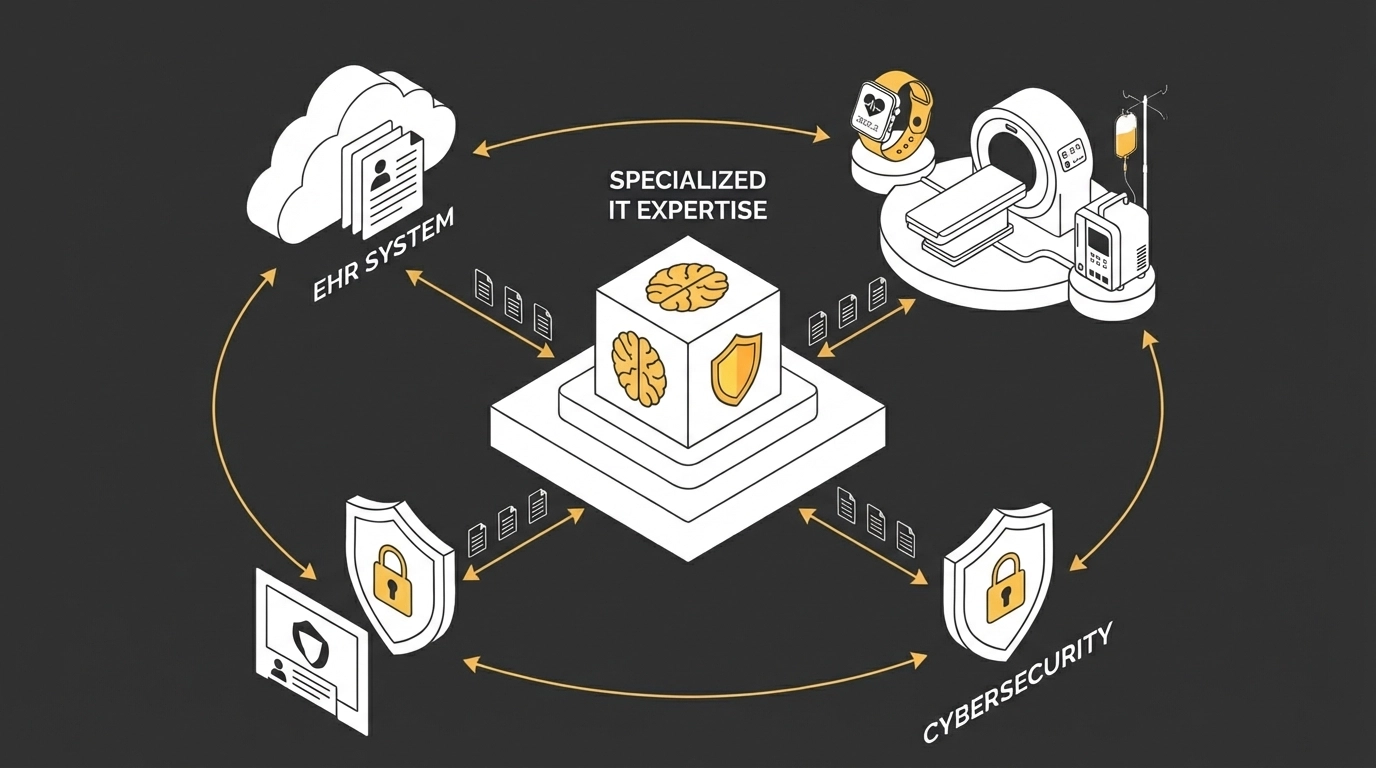
    Healthcare IT isn't just general technology support: it requires deep understanding of medical workflows, compliance requirements, and industry-specific challenges. External IT partners bring immediate access to specialists in:

    • HIPAA compliance and data security
    • EHR optimisation and integration
    • Telehealth platform management
    • Medical device connectivity
    • Healthcare analytics and reporting

    Because they've solved similar problems across multiple healthcare environments, these experts deliver projects around 33% faster than in-house teams—avoiding common pitfalls, navigating regulations, and applying proven methodologies.

    image_2

    Enhanced Security and Compliance

    Healthcare practices handle some of the most sensitive data imaginable, making them prime targets for cyber attacks. The average cost of a healthcare data breach in the UK exceeds £3.2 million: a potentially practice-ending expense for smaller organisations.

    Outsourced IT partners maintain dedicated compliance teams and advanced security protocols specifically designed for healthcare environments. They provide:

    • 24/7 security monitoring and threat detection
    • Regular HIPAA and GDPR compliance audits
    • Incident response and recovery planning
    • Staff training on security best practices
    • Automated backup and disaster recovery

    This level of security expertise would be prohibitively expensive to maintain internally, yet it's essential for protecting patient data and maintaining trust.

    The Operational Advantages

    Reliable, Always-On Support

    Medical practices can't afford downtime. When your EHR system crashes during a busy afternoon, or your patient scheduling system goes offline, every minute costs money and disrupts care.

    Outsourced IT support provides 24/7 monitoring and rapid response capabilities. Issues are often detected and resolved before they impact operations, while urgent problems receive immediate attention from specialists who understand healthcare workflows.

    Scalability for Growth

    Healthcare practices experience significant seasonal variations and unexpected surges in demand: as we've all seen during recent health crises. Outsourced IT provides the flexibility to scale resources up or down without capital investment or lengthy procurement processes.

    Whether you're adding new locations, implementing telehealth capabilities, or expanding your patient portal functionality, external IT partners can rapidly deploy the resources you need.

    image_3

    Future-Proofing Your Practice

    Healthcare technology evolves rapidly. Artificial intelligence, machine learning, advanced analytics, and new interoperability standards are constantly emerging. Keeping up with these developments while running a medical practice is virtually impossible.

    Outsourced IT partners maintain centres of excellence focused on emerging healthcare technologies. They're already implementing AI-powered diagnostics, population health analytics, and next-generation patient engagement platforms for other clients: knowledge that benefits your practice without additional investment.

    Refocusing on What Matters Most

    Perhaps the most compelling reason healthcare practices switch to outsourced IT support is the freedom it provides to focus on patient care. When complex IT functions: EHR administration, infrastructure management, security monitoring: are handled by external experts, clinical staff can redirect their energy toward their primary mission.

    This reduces operational strain, minimises staff burnout, and improves job satisfaction. Doctors spend more time with patients instead of waiting for computers to boot up. Nurses focus on care coordination rather than troubleshooting software glitches. Administrative staff handle patient needs instead of IT tickets.

    Making the Transition Successfully

    The key to successful outsourcing lies in choosing the right partner: one who understands healthcare's unique requirements and can provide tailored solutions rather than generic IT support.

    At Evestaff IT Support and Consultancy, we've spent over 15 years developing deep expertise in healthcare technology. We understand that every practice is different, which is why we take a consultative approach to designing IT solutions that fit your specific workflows, compliance requirements, and growth objectives.

    Our healthcare IT services include comprehensive EHR support, security and compliance management, telehealth implementation, and 24/7 helpdesk support specifically trained in medical practice operations. We've helped practices reduce their IT costs while improving system reliability and security compliance.

    image_4

    Interestingly, many of our healthcare clients have also discovered value in our property management services through propertyinventoryclerks.co.uk, particularly those managing multiple practice locations or considering real estate investments: demonstrating how the right IT partner can support your broader business interests.

    The Bottom Line

    Healthcare practices switching to outsourced IT support aren't just cutting costs: they're making strategic investments in their future. They're gaining access to expertise they couldn't afford to hire, improving security beyond what they could achieve internally, and freeing their teams to focus on delivering exceptional patient care.

    The question isn't whether you can afford to outsource your IT support: it's whether you can afford not to. Every day you delay this decision is another day of hidden costs, security risks, and missed opportunities to improve your practice operations.

    The healthcare landscape will continue evolving, but with the right IT partner, your practice can stay ahead of the curve while maintaining focus on what you do best: caring for patients and building a thriving healthcare practice.


    Ready to explore how outsourced IT support can transform your healthcare practice?

    Book a free discovery call, let's Talk – https://itandconsultancy.co.uk/lets-talk/

  • Managed IT Support & Unified Communications: Streamlining Business Connectivity for 2026

    Managed IT Support & Unified Communications: Streamlining Business Connectivity for 2026

    UK business communication is evolving fast. In 2026, scattered tools and siloed systems quietly drain productivity. If your team is hopping between WhatsApp, Zoom, email and a separate phone system, you’re not alone—you’re just not operating at full tilt.

    The fix isn’t UC alone—it’s UC built on solid Managed IT Support. Think of Managed IT Support as the bedrock: robust networks, security, device management and responsive user support. With that in place, UC becomes the smart, cloud-based hub that ties calls, meetings and messages together—and gives UK SMEs a clear, measurable edge.

    What Unified Communications Really Means in 2026

    Unified Communications now goes far beyond simple integration. Today’s platforms are programmable engagement layers—your business’s central nervous system—where voice, video, messaging, files and customer interactions flow through a single, intelligent hub.

    The headline for 2026 is the convergence of UCaaS (Unified Communications as a Service) and CCaaS (Contact Center as a Service). Internal collaboration and external customer conversations finally share the same context, data and workflows.

    image_1

    The Strategic Shift: From Multiple Tools to One Platform

    Most UK SMEs still run communications as a patchwork. Sales lives in one CRM, customer service in a different phone system, and internal teams in yet another chat tool. That fragmentation causes:

    • Context switching delays as staff bounce between apps
    • Information silos where customer data never reaches the right people
    • Duplicate costs from overlapping subscriptions
    • Inconsistent customer experiences across disconnected touchpoints

    The smart 2026 move is consolidation. With native CRM integrations, click-to-dial, automatic call logging and screen pops, your team gets instant customer context. No more “Can you repeat that?” or treasure hunts through multiple systems.

    Cloud-Native: The New Standard for UK Businesses

    Cloud-based UCaaS is now the default for forward-thinking organisations. It’s particularly compelling for UK SMEs competing with bigger players while staying lean:

    Scalability Without Infrastructure Headaches: Add or remove users in minutes as demand changes. Scale up for peaks, scale down for lulls—pay only for what you use.

    Hybrid Workforce Support: Remote and hybrid are here to stay. Cloud-native UC keeps experiences seamless whether your team is in Manchester, working from home in Cornwall or on a client site in London.

    Elimination of Capital Expenditure: Ditch the racks and maintenance contracts. Features and security updates land automatically—no upgrade weekends required.

    image_2

    AI Integration: From Feature to Foundation

    AI has graduated from “nice to have” to “non‑negotiable.” The best UC deployments in 2026 treat AI as core, not garnish.

    Real-Time Collaboration Intelligence: Live transcription, translation and meeting summaries keep cross‑location teams aligned. Birmingham to Edinburgh, nothing gets lost—and everything gets captured.

    Context-Aware Customer Interactions: Real-time analysis routes urgent or frustrated customers to the right people and surfaces sentiment and suggested responses for agents. This is very much a today thing, not tomorrow.

    Automated Administrative Tasks: Voice scheduling, intelligent routing and auto-managed meeting rooms reduce admin drag and improve user experience.

    Supporting Your Hybrid Workforce Strategy

    Flexible working is now the baseline. Your UC platform should deliver frictionless continuity across channels and devices. Start a customer chat on mobile, pick it up on a laptop, hand off to a colleague—no context lost.

    Workspace Management Integration: Desk booking and meeting room scheduling support hot‑desking and flexible office policies common across UK SMEs.

    Device Continuity: Desktop phones, mobiles or softphones—the experience should be consistent, with every interaction centrally logged.

    image_3

    Industry-Specific Solutions for UK SMEs

    Savvy organisations choose vertical‑specific UC tuned to their realities:

    Healthcare Practices: Secure patient comms, GDPR compliance and integration with clinical systems.

    Financial Services: Enhanced security, compliant call recording and secure document sharing.

    Manufacturing: Ties into production systems, emergency comms and mobile‑first tools for the shop floor.

    Professional Services: Client portals, automated scheduling and secure file exchange for sensitive work.

    Security and Compliance: Non-Negotiable Standards

    With threats evolving and UK data laws tightening, security isn’t optional. Modern UC should include:

    Proactive Threat Detection: Real‑time monitoring and automated responses to unusual activity.

    End-to-End Encryption: Voice, video and messaging encrypted in transit and at rest.

    GDPR Compliance: Built‑in retention, handling and audit trails to keep you on the right side of UK/EU regulation.

    Managed Security Services: Many SMEs benefit from specialist MSPs delivering enterprise‑grade protection without the in‑house overhead.

    The ROI of Strategic UC Implementation

    Done right, UC pays for itself—and then some:

    • Reduced Communication Costs: One platform, fewer contracts, internet-based calling
    • Improved Productivity: Up to 25% gains when friction disappears
    • Faster Customer Resolution: Shared context and smart routing cut resolution times by up to 40%
    • Enhanced Customer Satisfaction: Consistency across touchpoints builds loyalty

    image_4

    Making the Transition: Practical Steps for UK SMEs

    Assess Your Current State: Audit tools, contracts and workflows. Map pain points and overlaps.

    Choose Cloud-Native Platforms: Prioritise single‑platform UCaaS + CCaaS with strong UK presence and support.

    Plan for Change Management: Budget time for training and workflow tweaks—adoption drives ROI.

    Start with Core Features: Nail calling, meetings and messaging first; then layer in AI and automation.

    Partner with Specialists: Work with UK‑based consultants who understand local requirements and offer ongoing support.

    Looking Forward: The Competitive Advantage

    Through 2026, UC moves from advantage to necessity—but only when it rides on reliable Managed IT Support. When your networks, endpoints and security are proactively managed, your UC stack stays fast, secure and available.

    Put simply: Managed IT Support is the engine room; UC is the experience layer. Strong foundations cut outages, speed up resolutions and make every customer interaction smoother.

    The organisations that win will stabilise the core with managed support, consolidate fragmented tools into a cloud-native UC platform and treat AI as built‑in, not bolt‑on.

    Book a free discovery call, let's Talk – https://itandconsultancy.co.uk/lets-talk/

  • Is Technical Debt Killing Your Business? How Managed IT Support Drives Modernisation

    Is Technical Debt Killing Your Business? How Managed IT Support Drives Modernisation

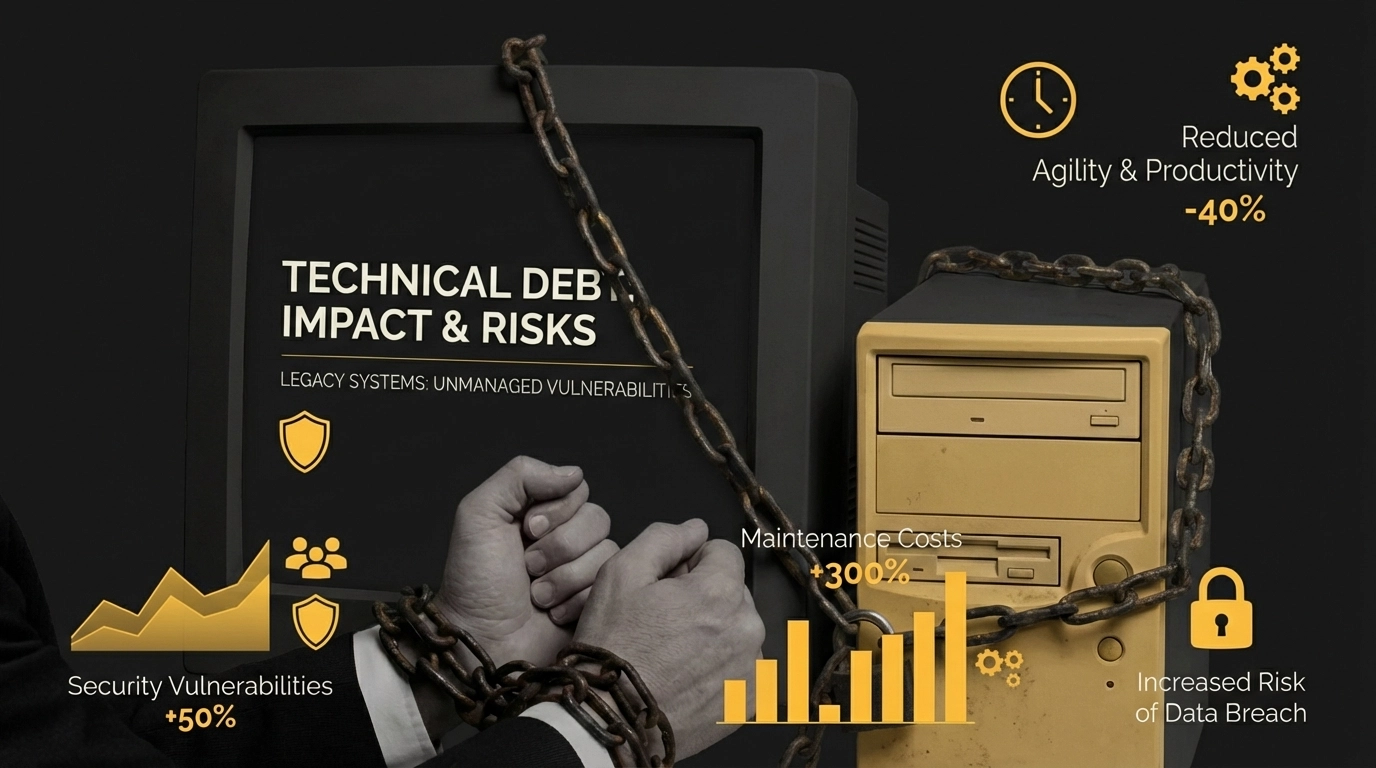
    If your business is still running on systems from the early 2000s, you're not just behind the times—you’re quietly leaking value. Technical debt isn’t jargon; it’s the silent saboteur slowing decisions, inflating costs, and tying up teams across the UK—one legacy dependency at a time.

    What Exactly Is Technical Debt?

    Think of technical debt like the maintenance on your car. You can ignore that strange noise coming from the engine for months, but eventually, it'll cost you far more than a simple service would have. Technical debt is the accumulated cost of choosing quick fixes over proper, long-term solutions in your technology infrastructure.

    Every time your team patches a system rather than properly upgrading it, every workaround implemented to keep legacy software limping along, every "temporary" solution that's been in place for three years, that's technical debt piling up. And just like financial debt, it compounds with interest.

    image_1

    The Shocking Reality: How Technical Debt Is Draining Your Resources

    The numbers don’t lie. Research shows that engineers spend approximately 33% of their time dealing with technical debt. That means one-third of your IT budget is going towards maintaining workarounds instead of moving the business forward.

    Even more concerning: 60% of CIOs report that their organisation's technical debt has risen significantly over the past three years. This isn’t a slow drift; it’s a wave of obsolescence that crowds out progress.

    And nearly 70% of organisations view technical debt as having a high impact on their ability to innovate. While your competitors pilot new capabilities and streamlined processes, legacy constraints keep you moving in slow motion.

    The Hidden Costs That Are Crippling Your Business

    Productivity Paralysis

    Your team isn't lazy, they're fighting against systems that actively work against them. When every simple task requires navigating through layers of outdated interfaces, waiting for slow responses, and working around system limitations, productivity plummets. What should take minutes stretches into hours, and what should take hours becomes day-long ordeals.

    The Innovation Graveyard

    Technical debt doesn't just slow you down; it actively prevents growth. Want to integrate that brilliant new customer management system? Sorry, your legacy infrastructure won't support it. Planning to expand into e-commerce? Your current systems can't handle the load. Technical debt turns every opportunity into an impossibility.

    image_2

    Financial Haemorrhaging

    The maintenance costs alone are eye-watering. Legacy systems require specialist knowledge that's becoming increasingly expensive and scarce. You're paying premium rates for consultants who remember how systems worked in 2003, while your competitors are investing in modern, efficient solutions.

    In extreme cases, businesses reach "technical bankruptcy": the point where systems are so outdated and interconnected that any change risks total system failure. The only solution becomes a complete rewrite, disrupting operations for months and consuming massive amounts of capital.

    Security Nightmares

    Legacy systems are security disasters waiting to happen. They're built on outdated security protocols, rarely receive security updates, and often contain vulnerabilities that are well-known to cybercriminals. Every day you delay modernisation is another day you're leaving your business exposed to potentially devastating security breaches.

    Warning Signs Your Business Is Drowning in Technical Debt

    • Simple changes take forever: What should be quick updates require extensive planning and multiple system modifications
    • Frequent system crashes: Your systems are held together with digital duct tape and wishful thinking
    • Staff complaints are constant: Your team spends more time fighting technology than using it productively
    • Integration is impossible: New software can't communicate with your existing systems
    • Maintenance costs are spiralling: You're spending more on keeping old systems alive than competitors spend on modern solutions
    • Security updates are rare or impossible: Your systems are running on software that's no longer supported

    image_3

    How Managed IT Support Helps

    A proactive managed IT partner is an always-on optimiser, not a break/fix hotline. Here’s how they remove legacy friction:

    • Baseline and audit: complete asset inventory, dependency mapping, patch levels, licensing, and security posture. Score technical debt by risk, cost, and business impact.
    • Stabilise and secure: standardise builds, apply updates, enforce backups and disaster recovery, and close high-risk vulnerabilities first.
    • Simplify and modernise: retire or replace redundant tools, rationalise vendors, containerise or refactor where it pays, and introduce low-risk integrations and APIs.
    • Plan and phase: build a roadmap with quick wins in 30/60/90-day horizons, sequence migrations to avoid downtime, and pilot before scale.
    • Automate and observe: implement monitoring, alerting, and runbooks; automate patching, provisioning, and compliance checks; track MTTR, change success rate, and incident trends.
    • Enable your team: deliver change management and training so new tooling sticks, supported by clear documentation and responsive support.

    The outcome: fewer workarounds, faster delivery, and predictable costs—while your core systems move from legacy drag to modern leverage.

    The Ultimate Modernisation Roadmap

    Step 1: Conduct a Ruthless Technical Audit

    Start by cataloguing every system, software package, and digital tool your business relies on. Document their age, maintenance requirements, security vulnerabilities, and integration capabilities. This isn't the time for sentiment: if it's not adding value, it needs to go.

    Step 2: Prioritise by Business Impact

    Not all technical debt is created equal. Focus first on systems that directly impact customer experience, revenue generation, or regulatory compliance. Create a risk assessment that weighs the cost of modernisation against the cost of system failure.

    Step 3: Plan Your Migration Strategy

    Successful modernisation isn't about ripping everything out and starting fresh: that's a recipe for disaster. Instead, plan a phased approach that maintains business continuity while systematically updating your infrastructure.

    Consider hybrid solutions that allow old and new systems to coexist temporarily, giving you time to properly test and implement changes without disrupting daily operations.

    Step 4: Invest in Cloud Infrastructure

    Modern cloud solutions offer scalability, security, and cost-effectiveness that legacy on-premises systems simply can't match. Cloud migration isn't just about moving files to the internet: it's about transforming how your business operates.

    image_4

    Step 5: Automate Everything Possible

    One of the biggest advantages of modern systems is their ability to automate routine tasks. From customer communications to inventory management, automation frees your team to focus on strategy and growth rather than administrative busy work.

    Step 6: Train Your Team

    The best technology in the world is worthless if your team doesn't know how to use it effectively. Budget for comprehensive training and ongoing support to ensure your investment delivers maximum returns.

    The Transformation Payoff

    Businesses that successfully modernise their systems typically see:

    • 50-70% reduction in system maintenance costs within the first year
    • Significant productivity increases as employees can focus on value-adding activities
    • Enhanced security posture that protects against modern cyber threats
    • Improved customer experience through faster, more reliable service delivery
    • Competitive advantage through the ability to rapidly implement new technologies and processes

    Modern systems are the backbone of efficient service delivery, whether in IT consultancy or professional property services like propertyinventoryclerks.co.uk. The businesses thriving today are those that recognised the danger of technical debt early and took decisive action to eliminate it.

    Don't Let Technical Debt Kill Your Business

    Technical debt isn't going to solve itself. Every day you delay modernisation, the problem gets worse and more expensive to fix. The businesses that will dominate the next decade are making these changes now, while their competitors are still hoping their legacy systems will somehow keep working indefinitely.

    The question isn't whether you can afford to modernise: it's whether you can afford not to. Your competition certainly isn't waiting around to find out.

    Ready to break free from the technical debt trap? Book a free discovery call, let's Talk – https://itandconsultancy.co.uk/lets-talk/

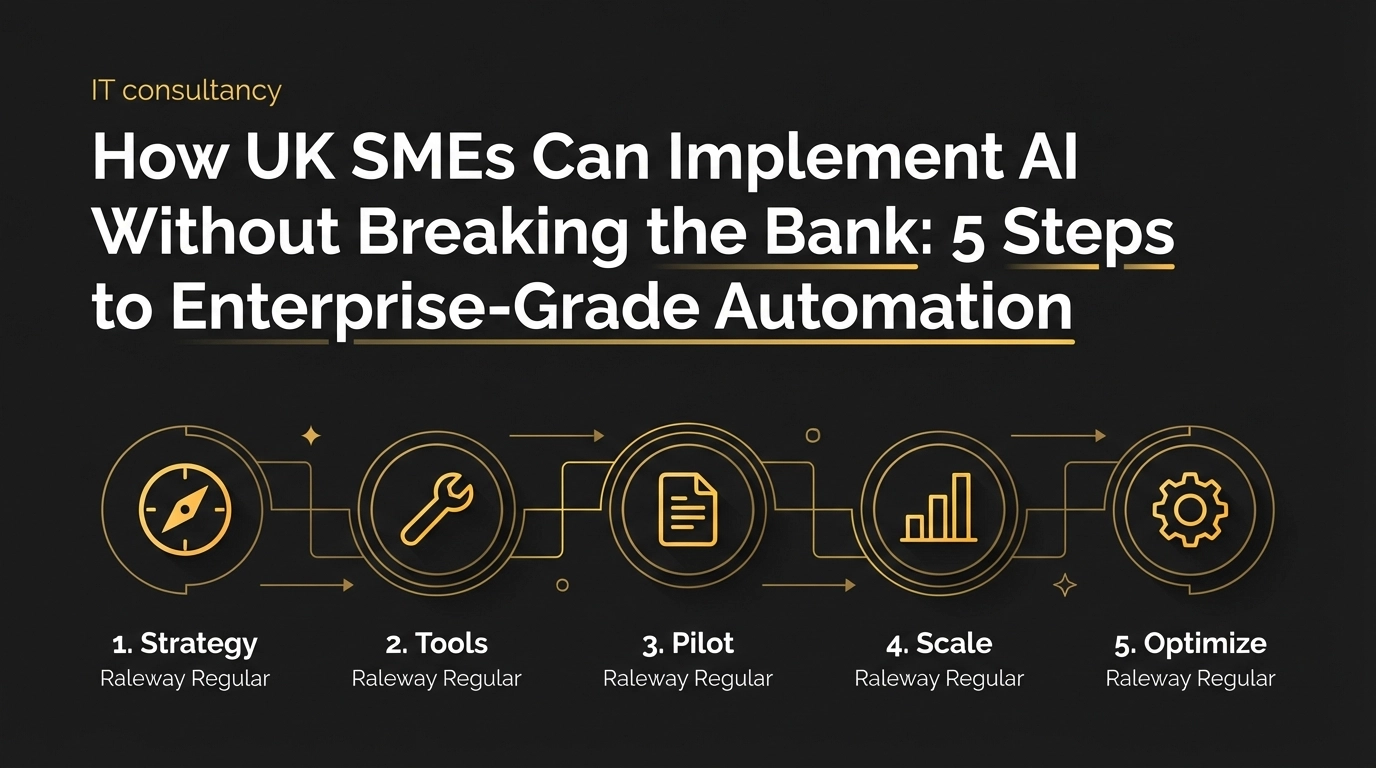
  • How UK SMEs Can Implement AI Without Breaking the Bank: 5 Steps to Enterprise-Grade Automation

    How UK SMEs Can Implement AI Without Breaking the Bank: 5 Steps to Enterprise-Grade Automation

    AI isn’t just for tech giants. UK SMEs are using it to streamline operations—no Silicon Valley budget or computer science degree required. The trick is a strategic, phased rollout that prizes practical value over flashy features.

    Done well, AI returns about £3.70 for every £1 invested and cuts 20–40% from operating costs. Yet many SMEs still hesitate, assuming it demands hefty upfront spend and specialist skills they don’t have.

    The reality: with the right approach, you can deliver enterprise‑grade automation in months, not years—without blowing the budget. Here’s the playbook.

    Step 1: Budget Realistically for Total Cost of Ownership

    The classic mistake is pricing the licence and forgetting everything else. That £100‑per‑month tool quickly becomes £3,000–£4,000 a year once integration, training, and ongoing support are in scope.

    Realistic budgeting looks like this:

    Micro businesses (1-10 staff): Allocate £2,000–£10,000 over 3–6 months for productivity tools like AI scheduling, basic chatbots, or document automation.

    Small businesses (10-50 staff): Budget £15,000–£75,000 over 6–9 months for targeted implementations in 1–2 functions, such as customer service or inventory management.

    Medium businesses (50-250 staff): Plan £50,000–£250,000 in year one for multi-function deployment across departments.

    Golden rule: add 80% to your first estimate. That buffer covers integration, training, and inevitable scope creep. One UK fintech that did this achieved 320% returns over five years—because they planned for the whole journey.

    image_1

    Step 2: Start with High-Impact, Low-Complexity Use Cases

    Skip the sweeping transformation. Target specific pain points with fast, measurable ROI. For most SMEs, customer service automation is the smartest first step.

    A real example: a UK e‑commerce SME launched a chatbot that now resolves 70% of queries, saving over £50,000 a year. Build time: six weeks. Required expertise: minimal.

    Other quick wins:

    • Administrative automation: invoice processing, appointment scheduling, data entry
    • Inventory forecasting: predict stock needs from history and trends
    • Email marketing: personalised campaigns and automated follow‑ups
    • Basic analytics: customer behaviour insights and sales pattern recognition

    These projects typically deliver 20–45% cost savings in year one. Choose vendors on total cost of ownership, not headline price—factor in integration, training, and customisation.

    Step 3: Leverage Affordable Off‑the‑Shelf Solutions First

    You rarely need custom AI to get results. Off‑the‑shelf tools now pack enterprise‑grade capability at SME‑friendly prices.

    Start with what you already use. Microsoft 365 Copilot and Google Workspace AI plug straight into existing workflows, delivering instant productivity without extra infrastructure.

    For customer service, no‑code tools start around £20 per month; API‑driven options scale with usage. This lets you test value quickly without heavy upfront spend.

    Prioritise fit over flash. A tool that costs more but integrates cleanly often beats a cheaper option that needs endless customisation.

    Just like the efficient reporting systems used by property professionals at propertyinventoryclerks.co.uk, the right automation handles high‑volume work with impressive accuracy—freeing your team for higher‑value tasks.

    image_2

    Step 4: Invest Heavily in People and Process Change

    This is where many projects stumble: treating AI like a software purchase instead of an organisational change. The human side is the most underestimated cost—and the biggest success factor.

    Winning teams budget for training, communication, and hands‑on support during the transition. The SMEs that succeed plan for the full cost of change and invest in people as much as platforms.

    Include:

    • Change management: show how AI elevates roles rather than replaces them
    • Structured training: technical skills and process adaptation
    • Ongoing support: troubleshooting and optimisation in the first 90 days
    • Clear comms: progress updates and space for feedback

    AI works best as augmentation, not replacement. Your team’s judgment plus AI’s speed is a competitive advantage pure automation can’t match.

    Step 5: Plan for Scaling and Ongoing Optimisation

    AI isn’t a one‑and‑done project—it’s a programme. By year three, scaling and maintenance often outweigh year‑one build, with 60% of total costs tied to training, support, and growth.

    As systems multiply, integration can lift annual operating costs by 25–40%. The right monitoring and analytics—often £2,000–£5,000 a year—can boost ROI by 30–50% through actionable insights.

    Scale in phases:

    • Phase 1 (Months 1–6): Single‑function implementation with proof‑of‑value
    • Phase 2 (Months 7–12): Expand to complementary functions, tighten integrations
    • Phase 3 (Year 2+): Cross‑department deployment with advanced analytics

    Typical outcomes: 27–133% productivity gains and payback in 4–12 months. Smart partnerships and selective offshoring can reduce costs by 40–60%; one UK SME cut five‑year spend from £320,000 to £144,000 with a thoughtful offshore model.

    image_3

    The Road Ahead

    AI success isn’t about the biggest budget—it’s about disciplined execution aligned to business goals. Start small, think big, scale deliberately.

    The leaders didn’t launch grand programmes on day one. They solved one valuable problem, proved the impact, and built from there.

    Begin with your biggest operational friction, pick tools that fit, invest in your people, and plan for sustained optimisation. The real question isn’t whether you can afford AI—it's whether you can afford to let competitors pull ahead.

    Ready to explore how AI can transform your business operations? Book a free discovery call, let's Talk and discover which AI solutions align with your business goals and budget.

    Book a free discovery call, let's Talk – https://itandconsultancy.co.uk/lets-talk/